
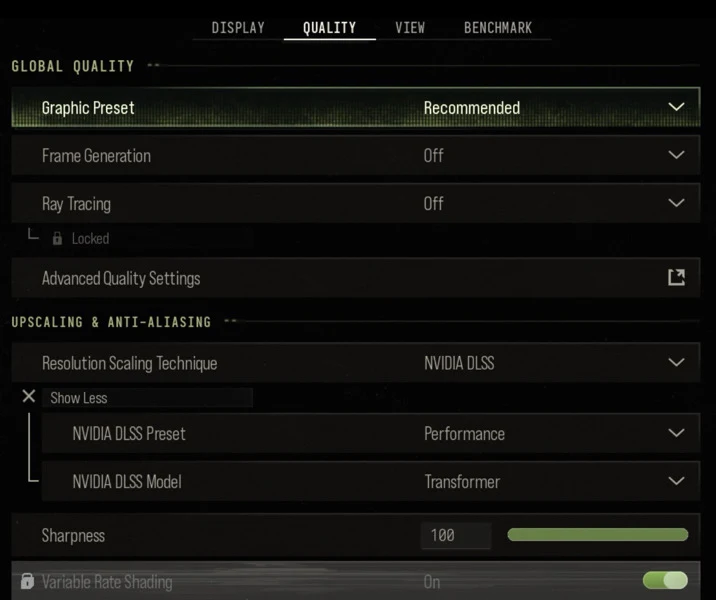
Modern Warfare 4's campaign is a showcase for the game's visuals, but the best PC settings for a cinematic story mode are not the same as for competitive multiplayer. Here is what Activision officially recommends, a widely used performance baseline, and which options are worth raising when you are playing the campaign rather than chasing every frame.
Key points
- Activision targets 90 FPS on High at its recommended specs: Ryzen 5 3600 or Core i7-8700K, 16 GB RAM and an RX 6600 XT, RTX 3060 Ti or Arc B580.
- TPM 2.0 and Secure Boot are required on PC, and an SSD with 115 GB free is mandatory.
- Ray tracing is supported in the campaign, but Activision's ray-tracing specs call for an RTX 5070 Ti or RX 9070 XT and 32 GB RAM for 4K upscaled.
- Upscaling options include DLSS 4.5, FSR Redstone, XeSS 3 and Filmic SMAA T2X.
- A built-in Benchmark Tool can suggest settings for your system.
Official PC requirements
According to the official Call of Duty PC blog, the three tiers are:
- Minimum: Windows 10 64-bit, Ryzen 5 1400 or Core i5-6600, 8 GB RAM, RX 470, GTX 970/1060 or Arc A580, 3 GB video memory.
- Recommended (90 FPS in multiplayer on High): Windows 11 64-bit, Ryzen 5 3600 or Core i7-8700K, 16 GB RAM, RX 6600 XT, RTX 3060 Ti or Arc B580, 8 GB video memory.
- Ray tracing (High ray tracing at 4K upscaled): Ryzen 7 3700X or Core i7-10700K, 32 GB RAM, RX 9070 XT or RTX 5070 Ti, 16 GB video memory.
All tiers need an SSD with 115 GB free, DirectX 12 and broadband. Only Intel and AMD processors with AVX are supported, and Intel Arc cards need Resizable BAR enabled. Activision's recommended drivers are NVIDIA 616.56, AMD 26.7.1 and Intel 32.0.101.8974.
Start with the game's own tools
Activision says the game automatically configures settings based on your hardware. It also has a Benchmark Tool that shows average FPS, CPU and GPU load and input latency, then suggests settings to improve performance. Run it once before you change anything, so you know where you are starting from.
Install the Xbox PC app before launch if you want Advanced Shader Delivery, which provides precompiled shaders so the game starts faster. Activision says this is optional.
A performance baseline
Dexerto's PC settings guide is built for multiplayer and DMZ, where maximum FPS and visibility matter most. Its key recommendations include:
- Display Mode: Fullscreen Exclusive, at your monitor's native resolution and maximum refresh rate.
- NVIDIA Reflex Low Latency: On + Boost. V-Sync (Gameplay): Off.
- Custom frame rate limit: a few frames under your monitor's maximum refresh rate.
- Ray Tracing and Frame Generation: Off.
- Upscaling: DLSS, or the FSR/XeSS equivalent for your GPU, with Sharpness at 80.
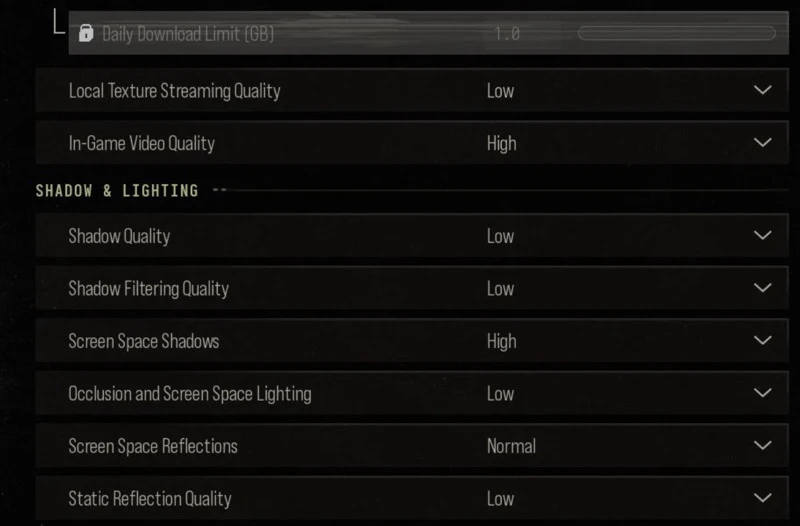
- Shadow Quality: Very Low. Screen Space Reflections and Occlusion and Screen Space Lighting: Off.
- Motion blur, depth of field and film grain: Off.
- Field of View: 105.
These settings prioritise frame rate over looks. They are a good starting point on a mid-range PC, or if you play multiplayer and campaign with one profile.
What to raise for the campaign
The following is general guidance, not official advice. In a single-player story, a steady 60 FPS or more usually feels smooth, so you can spend some performance on visuals. If you have headroom over that, these settings tend to make the most visible difference:
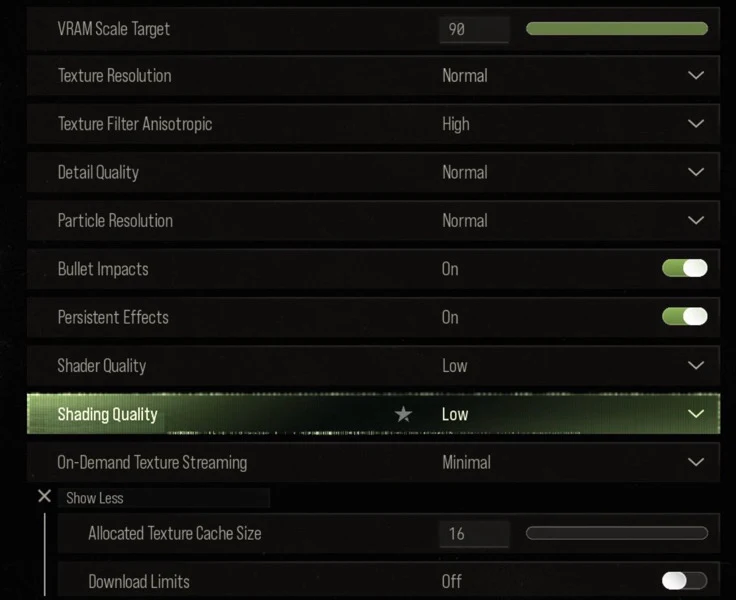
- Texture Resolution: raise it as far as your video memory allows. The VRAM Scale Target setting helps keep you within your card's limit.
- Shadow Quality and Shadow Filtering: these strongly affect how scenes look and are worth raising from Very Low first.
- Occlusion and Screen Space Lighting, and Screen Space Reflections: Activision has improved both for MW4. They add depth to indoor and night scenes.
- Ray tracing: only if your hardware is near Activision's ray-tracing tier. Otherwise the cost in FPS is high.
- Frame Generation: can raise smoothness in the campaign, but adds some latency, which matters less here than in multiplayer.
- World Depth of Field: MW4 splits depth of field into World and Weapon settings, so you can keep a sharp world while turning on the weapon effect for cinematic aiming.
Change one setting at a time and check your FPS in a busy scene, or run the Benchmark Tool again.
If performance is poor
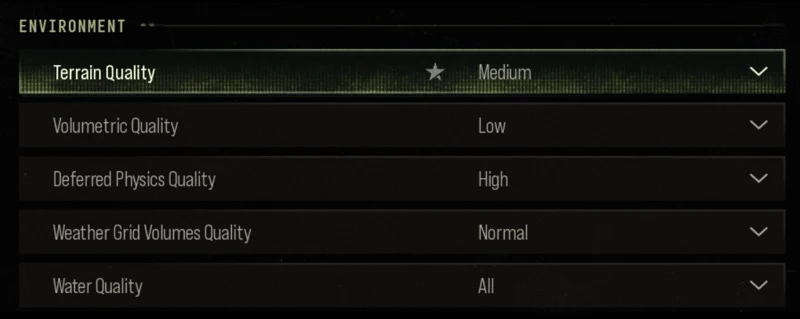
Update your graphics driver to Activision's recommended version first. Make sure the game is installed on an SSD, and lower shadows, volumetrics and particle settings before you lower resolution. Upscaling at a Quality or Balanced preset usually looks better than dropping your native resolution.
Why it matters
MW4 is designed to scale from older GPUs to high-end ray tracing, and its 800+ options mean the defaults are rarely ideal for everyone. A few minutes with the benchmark and the key settings above can make the campaign look noticeably better while staying smooth.


Comments